- Township
- 4.9

My Supermarket Simulator 3D
Screwdom
456 Run Challenge: Clash 3D
Block Blast!
Jewel Blast : Temple
Fruit Merge: Juicy Drop Game
Papa's Freezeria To Go!
Poppy Playtime Chapter 2
Poppy Playtime Chapter 1
Pokemon Go
Toca Life World
Roblox
Angry Birds Friends
slither.io
Forspoken
Dying Light 2 Stay Human
















Developer:
PLR Worldwide Sales LimitedLatest Version:
8.1.2Updated on:
March 13, 2021File Size:
262.18 MB
Install To Phone
Choose a platformThe games on our website are sourced from the App Store and Google Play. No viruses, no malware, you can download them through the recommended download links.
Township: A Complete Guide to Building Your Dream Town
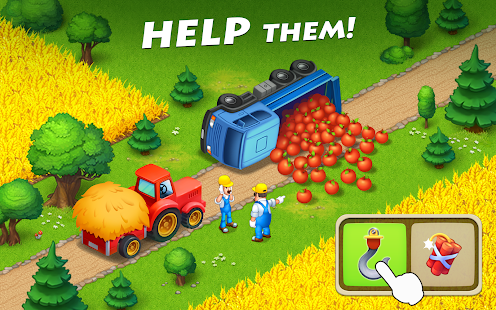
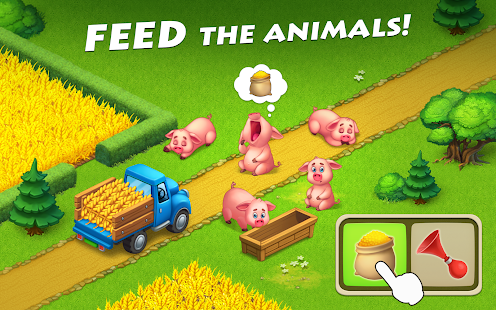
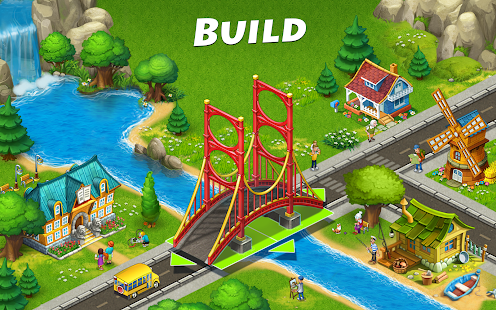
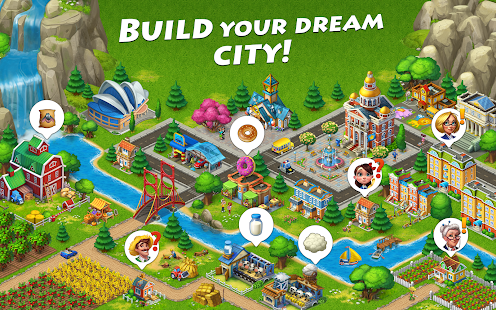
Township is a city-building and farming game developed by Playrix, in which players take on the role of a mayor tasked with growing a small settlement into a thriving town. It combines two mechanics that don't usually sit together this comfortably: the slow, satisfying rhythm of farm management and the puzzle-like layout challenge of urban planning. I've spent a lot of hours in games like this over the years, and Township earns its long-term audience by giving players something to do at almost every visit, whether that's five minutes or an hour.
The game runs on mobile devices through the App Store and Google Play, and it has also been available as a browser title in the past. What keeps people coming back isn't flashy graphics, it's the steady loop of planting, harvesting, manufacturing, and building, paired with community features like co-op and regional expansion that give the game a longer arc than most casual titles attempt.
What is the objective of the Township game?
The core objective in Township is to build and expand a town by balancing agriculture, manufacturing, and construction. Players plant crops, harvest them, and feed the results into factories that turn raw materials into goods. Those goods get sold, shipped by train or plane, or used to complete orders from townsfolk and traders.
There's no single win condition. Instead, progress is measured in population growth, town level, and how far you push into the game's later systems: mining, the zoo, regional expansion, and seasonal events. In practice, the objective shifts as you level up. Early on it's about not running out of storage space. Later it becomes about optimizing production chains so you're not standing around waiting for factories to finish.
How do you play the game Township?
Township starts you off with a small plot of land, a few crop fields, and a handful of buildings. You harvest crops, move goods into factories, and use the finished products to fulfill requests from the community board, airplane, or train, which reward coins and experience points.
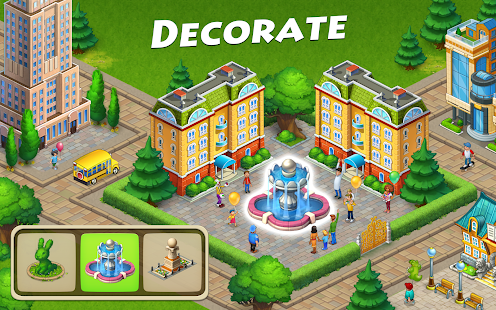
As you level up, new buildings, decorations, and crops unlock. The trick that trips up new players is treating factories like an afterthought. In practice, your factory queue matters more than your fields once you're a dozen levels in, because factories take real time to process (some items take hours), and letting them sit empty is the single biggest efficiency loss in the game.
A few systems you'll run into as you play:
- Farming: planting and harvesting wheat, corn, cotton, and other crops on a grid of fields
- Manufacturing: converting raw crops into goods at factories like the bakery or dairy
- Trading: fulfilling orders via train, plane, and the community board for coins and experience
- Construction: building houses and community buildings to grow your population cap
- Mining and the zoo: side systems that unlock at higher levels for extra resources and decoration
Is Township easy to play?
Township is easy to pick up but has real depth once you're several hours in. The early game holds your hand well, tutorial prompts walk you through planting your first crops and building your first factory, and there's no combat or fail state to worry about.
Where it gets trickier is resource management at higher levels. Storage fills up fast, certain goods require ingredients from multiple factories, and events run on tight timers. The best players I've seen treat their storage upgrades as a priority almost equal to new buildings, because nothing stalls progress faster than a warehouse that's full when a big harvest comes in.
What are the Township mini games and events?
Township runs regular mini games and limited-time events on top of the main city-building loop, and these often get asked about separately from the core game (sometimes referred to loosely as an 'egg game' or similar seasonal event depending on the theme). These events usually task players with collecting specific items, completing timed goals, or contributing to community-wide targets for shared rewards.
Events rotate through different formats: some focus on the zoo, some on the regional map, some on specific factories getting temporary bonus items. They're optional but tend to offer decorations, currency, or animals you can't easily get otherwise, so it's worth checking in during an active event even if you only have a few minutes.
What platforms can you play Township on?
Township is available on iOS and Android as a free-to-download app, published through the App Store and Google Play. The developer listed in current app store builds is PLR Worldwide Sales Limited, operating under Playrix, the studio behind the franchise.
There have been browser and PC-adjacent versions of Township at different points, largely through emulation or web wrapper approaches rather than a native desktop client. If you're specifically hunting for a way to play on a bigger screen, an Android emulator on PC is the most reliable route, since the mobile version is the one actively maintained and updated.
- iOS: available through the App Store on iPhone and iPad
- Android: available through Google Play, also compatible with most Android emulators
- Browser/PC: historically available via web versions or emulators, not a dedicated native client
What tips help you grow your Township faster?
The fastest growth in Township comes from keeping every factory running and never letting fields sit empty. Idle production time is the number one thing that slows new players down without them realizing it.
A few habits make a noticeable difference over time:
- Queue factory production before you log off so goods are ready when you return
- Upgrade storage barns early rather than waiting until they're overflowing
- Prioritize community board requests that reward experience points when you're trying to level up
- Join or form a co-op to access regional expansion and trading with other players
- Keep a rotation of crops going so you're never waiting on a single bottleneck ingredient
Frequently Asked Questions
How do you play the game Township?
You plant and harvest crops, convert them into goods at factories, and sell or trade those goods to earn coins and experience, using the proceeds to expand your town with new buildings and population.
Is Township easy to play?
Yes, the basics are simple and tutorial-guided, but managing storage, factory queues, and event timers adds real strategic depth as your town grows.
What is the objective of the Township game?
There's no fixed end point. The objective is to grow your population, town level, and production efficiency by balancing farming, manufacturing, and construction.
Can you play Township for free?
Township is downloadable from the App Store and Google Play as a free app, with optional in-game purchases for currency and speed-ups.
Is Township available on PC?
There isn't an official native PC client. Players who want a desktop experience typically use an Android emulator to run the mobile version.












Similar Games
Samkok: New Force
Snake Clash!
Kpop Piano Beats - Music Game
Friday Night Funkin'
Buildit
Sprunki Beat: Full Mod Music
Conquer Countries
Gossip Harbor: Merge & Story
Carnival Tycoon: Idle Games
Music Piano 7: Rush Song Games
Kingshot
My Talking Tom Friends 2
Goods Puzzle: Sort Challenge
I Am Security
Last War:Survival Game
mo.co
Block Crazy Robo World
Color Block Jam






Reviews
No comment yet !