
- LifeAfter
- 4.0

My Supermarket Simulator 3D
Screwdom
456 Run Challenge: Clash 3D
Block Blast!
Jewel Blast : Temple
Fruit Merge: Juicy Drop Game
Papa's Freezeria To Go!
Poppy Playtime Chapter 2
Poppy Playtime Chapter 1
Pokemon Go
Toca Life World
Roblox
Angry Birds Friends
slither.io
Forspoken
Dying Light 2 Stay Human
















Developer:
NetEase GamesLatest Version:
1.0.183Updated on:
March 10, 2021File Size:
75M
Install To Phone
Choose a platformThe games on our website are sourced from the App Store and Google Play. No viruses, no malware, you can download them through the recommended download links.
LifeAfter: A Survivor's Guide to NetEase's Zombie Survival Game
LifeAfter is a survival game developed and published by NetEase, first launched for iOS in November 2018 before expanding to Android and Windows. It drops you into a post-apocalyptic world overrun by an infection that has turned most of the population into the walking dead, and it asks you to scavenge, build, and fight your way to something resembling a normal life again.
I have put a stretch of hours into this one over the years, on both a phone and a PC emulator, and it holds up as one of the more ambitious mobile survival titles out there. It borrows structure from games like DayZ and State of Decay but wraps it in the gacha and live-service systems you would expect from a NetEase mobile release. That combination is exactly what makes it worth breaking down before you commit real time to it.
What Kind of Game Is LifeAfter?
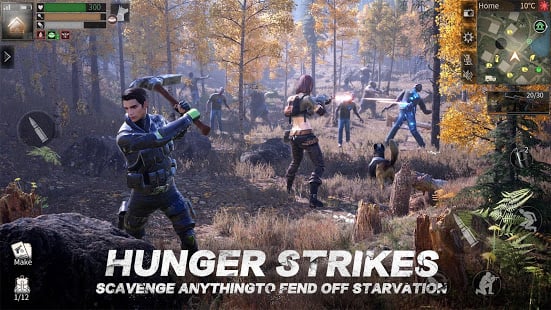
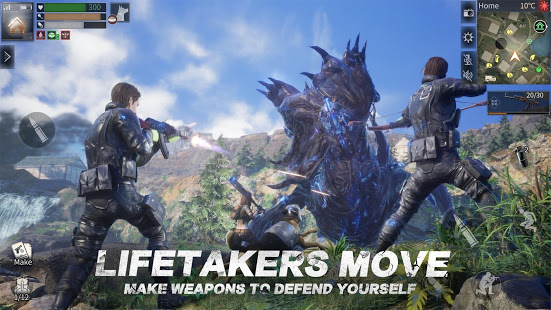
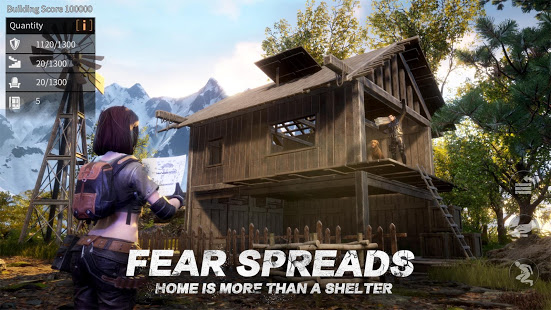
LifeAfter is an open-world survival game with shooter and massively multiplayer elements, built on NetEase's own NeoX engine. You control a survivor in a quarantined region, and the loop is familiar to anyone who has played a survival crafting title: gather materials, craft gear, build a shelter, and push into more dangerous zones as your character grows stronger.
What sets it apart from a lot of mobile competitors is scale. The world is genuinely large, split into multiple named regions, and NetEase has kept adding content since 2018 rather than letting the game go stale. In practice that means new players today are dropping into a much bigger game than the one that launched.
What Platforms Can You Play LifeAfter On?
LifeAfter runs on Android, iOS, and Microsoft Windows, with cross-platform progression tied to your account rather than your device. That means you can start on a phone during a commute and pick the same character up on a PC client later, which is one of the smoother cross-play setups I have seen in this genre.
There is no official Steam release. Players who want a proper mouse-and-keyboard session generally go through NetEase's own PC client or run an Android emulator, both of which mirror the mobile version rather than offering a separate build.
How Do You Play LifeAfter on PC?
The most reliable way to play LifeAfter on PC is NetEase's own downloadable client for Windows, which installs the full game outside of an emulator layer and tends to run smoother than third-party options. Download it from NetEase's official LifeAfter site, sign in with the same account you would use on mobile, and your survivor and inventory carry over.
The alternative route is an Android emulator, which some long-time players still prefer because it lets you remap controls more freely. Either way, check your specs against the requirements below before installing, since the game leans on decent RAM and a dedicated graphics card once you get into busier shelter areas.
- OS: Windows 7 or later (64-bit recommended)
- RAM: 4GB minimum, 8GB for smoother performance
- Storage: several GB free, since content updates add up over time
- Graphics: a dedicated GPU is recommended for stable frame rates in crowded zones
How Do You Play LifeAfter on Android?
Playing LifeAfter on Android just means installing it from the Google Play Store, where it is listed as a free app published by NetEase, then signing in and running through the tutorial that teaches scavenging and base building. The file size sits in the range of tens of megabytes for the base install, with additional assets downloaded on first launch.
Android requirements are modest by modern standards but not trivial. You will want a phone from the last several years for consistent frame rates, especially in later-game combat zones where a lot of effects and other players can be on screen at once.
- Android version: 5.0 or higher on most listings
- RAM: 2GB minimum, 3GB or more recommended
- Storage: enough free space for the base client plus downloaded content packs
- A stable internet connection, since LifeAfter is an always-online game
Is LifeAfter Made by NetEase?
Yes. LifeAfter is developed and published by NetEase Games, credited alongside NetEase and Hong Kong NetEase Interactive Entertainment Limited across storefront listings, with X.D. Global also involved in publishing in some regions. NetEase is the same studio behind other long-running mobile hits, and it has kept LifeAfter updated with seasonal events and collaborations well past its 2018 launch, including a Resident Evil crossover that brought new areas and gear into the game.
Is LifeAfter Pay to Win?
LifeAfter is free to install and playable without spending money, but it does include a cash shop and top-up system that speeds up crafting, storage, and cosmetic progression, which puts it closer to free-to-play-with-monetization than a pure pay to win design. In practice, what trips up new players is comparing early raid difficulty to well-geared veterans and assuming money is the only gap. Time invested matters just as much, since gear tiers are earned through crafting chains and base upgrades that anyone can grind out.
The best players I have seen in this game lean on efficient resource routes and squad coordination rather than pure spending. Topping up can shorten queues and unlock skins, but it does not replace learning the map or knowing when to fight versus when to run.
What Do the Maps Look Like in LifeAfter?
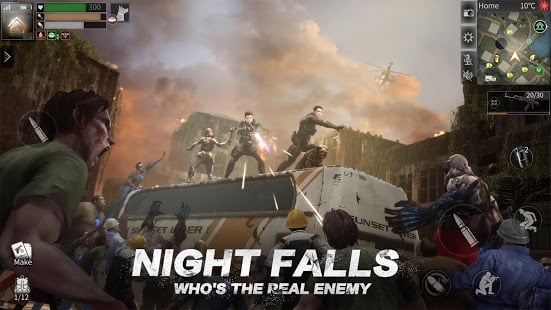
LifeAfter's world is divided into distinct outdoor regions plus instanced areas for events and raids, each with its own visual identity, resource types, and infected threat level. Early zones are built to teach scavenging and combat basics, while later maps push into denser infected territory and PvP-adjacent content for players chasing rarer materials.
NetEase has expanded the map roster steadily since launch rather than leaving it static, which is part of why the game still has an active community years later even as some players on forums have noted quieter periods. Reading the map legend before a supply run saves a lot of wasted trips, since danger tiers are usually marked clearly enough to plan a route around them.
Frequently Asked Questions
Is LifeAfter developed by NetEase?
Yes, LifeAfter is developed and published by NetEase Games, with additional publishing credits to Hong Kong NetEase Interactive Entertainment Limited and X.D. Global in some regions.
Is LifeAfter pay to win?
No, not strictly. LifeAfter has a cash shop that speeds up progression and unlocks cosmetics, but core gear and survival systems can be earned through regular crafting and grinding without spending money.
Can I play LifeAfter on PC without an emulator?
Yes, NetEase offers an official Windows client for LifeAfter that installs and runs the game natively rather than through an Android emulator.
When did LifeAfter release?
LifeAfter's initial release date is listed as December 17, 2018, following an open beta for iOS that began in November 2018, with a wider rollout to Android and Windows shortly after.
Is LifeAfter on Steam?
No, LifeAfter does not have an official Steam listing. It is available through the App Store, Google Play, and NetEase's own PC client.













Similar Games
Samkok: New Force
Snake Clash!
Kpop Piano Beats - Music Game
Friday Night Funkin'
Buildit
Sprunki Beat: Full Mod Music
Conquer Countries
Gossip Harbor: Merge & Story
Carnival Tycoon: Idle Games
Music Piano 7: Rush Song Games
Kingshot
My Talking Tom Friends 2
Goods Puzzle: Sort Challenge
I Am Security
Last War:Survival Game
mo.co
Block Crazy Robo World
Color Block Jam






Reviews
No comment yet !