
- Happy Wheels
- 4.5

My Supermarket Simulator 3D
Screwdom
456 Run Challenge: Clash 3D
Block Blast!
Jewel Blast : Temple
Fruit Merge: Juicy Drop Game
Papa's Freezeria To Go!
Poppy Playtime Chapter 2
Poppy Playtime Chapter 1
Pokemon Go
Toca Life World
Roblox
Angry Birds Friends
slither.io
Forspoken
Dying Light 2 Stay Human
















Developer:
Jim BonacciLatest Version:
1.0.9Updated on:
19 March 2021File Size:
29M
Install To Phone
Choose a platformThe games on our website are sourced from the App Store and Google Play. No viruses, no malware, you can download them through the recommended download links.
Happy Wheels: The Ragdoll Physics Game That Refuses to Die
Happy Wheels is a side-scrolling ragdoll physics game created by designer Jim Bonacci and published by Fancy Force, first released in 2010. The premise is simple on paper and brutal in practice: pick a rider, mount an absurd vehicle, and try to survive a gauntlet of saw blades, spikes, and collapsing platforms without your character coming apart at the joints.
I've gone back to this game more times than I can count over the years, and it holds up for a reason most modern browser games don't bother chasing. It doesn't reward reflexes alone. It rewards patience, momentum management, and a willingness to watch your character die in increasingly creative ways before you finally clear a stage.
How Do You Play Happy Wheels?
You play Happy Wheels by steering a character and vehicle combo across a hazard-filled 2D course using arrow keys or WASD, with separate keys to lean forward and back for balance. Momentum is everything here. Lean too far into a jump and your rider tips over the handlebars; hold back too long on a descent and you lose the speed you need to clear the next gap.
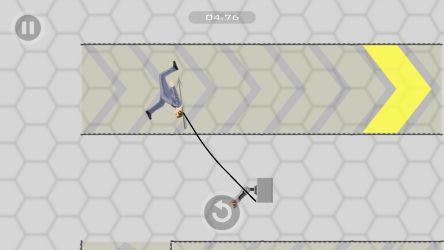
Most levels are built like obstacle courses stacked with saw blades, mines, and drop-offs, and the segmented ragdoll bodies mean a bad landing can cost you a limb rather than just a life. New players usually die within the first ten seconds of a level the first few tries. That's normal. The game expects it.
What Characters Can You Choose in Happy Wheels?
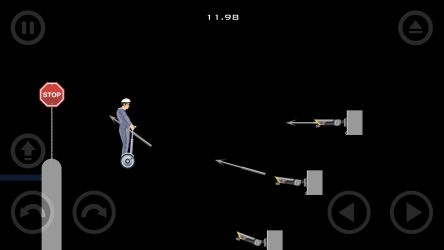
Happy Wheels gives players a roster of distinct characters, each riding a different vehicle with its own handling quirks. The segway-riding businessman is the default starting character and probably the most forgiving for learning the controls.
What trips up new players is assuming every character behaves the same way. They don't. Some vehicles have far more traction, some riders can eject and continue on foot if things go wrong, and choosing the right one for a level's terrain matters more than raw skill.
- Segway Guy, the balanced all-rounder good for learning momentum
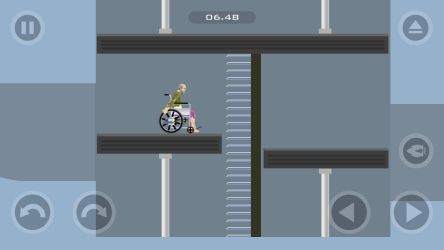
- Wheelchair Guy, who can be ejected from his chair mid-run
- Moped Couple, riding double with shared risk
- Irresponsible Dad, pulling a stroller that adds an extra layer of danger
- Lawnmower Man, built for rough, uneven terrain
Where Can You Play Happy Wheels Online?
Happy Wheels can be played through the developer's own site, Totaljerkface.com, along with mirrors on portals like CrazyGames and Poki that run the game in-browser. Totaljerkface has been rebuilding the game in JavaScript since Flash was phased out of browsers, since the original build ran on Flash technology.
If you're browsing around looking for it, you'll see it listed under a handful of aggregator sites. Quality varies between mirrors, so stick to versions that load cleanly and don't bury the play button under ads.
Is Happy Wheels Available on Mobile?
Happy Wheels has an official mobile version published on both Google Play and the Apple App Store, built by Fancy Force specifically for touchscreens. The mobile release reworks the lean-and-balance controls into on-screen buttons, which takes a bit of adjustment if you learned the game on a keyboard first.
The mobile listing on Google Play notes the game has racked up over a billion plays across its lifetime online, which tells you something about how long this thing has stuck around since 2010. Playing on mobile is honestly a fine way to kill ten minutes, though I still find keyboard controls give you finer control over leaning.
Can You Play Happy Wheels on PC and Steam?
Happy Wheels runs on PC through any modern browser via Totaljerkface or supported game portals, and it has also appeared as a downloadable release tied to Steam in some regions. Playing through a browser on desktop remains the most reliable route, since it doesn't require an install and updates automatically as Totaljerkface migrates the game away from Flash.
PC is where the game is easiest to control in my experience. A physical keyboard gives you the precision that touch controls can't quite match, especially on levels that demand fine-tuned leaning through narrow gaps.
What Makes Happy Wheels Different From Other Physics Games?
Happy Wheels stands out from other ragdoll and physics platformers because of its level editor, which lets players build and publish their own courses rather than only playing developer-made stages. That user-generated content pipeline is a big part of why the game kept an audience for over a decade instead of fading after launch.
The best players I've seen in community-made levels aren't the fastest, they're the ones who understand exactly how much lean a jump needs before committing. That's the real skill ceiling here. It's less about twitch reaction and more about reading the physics engine like a second language.
Frequently Asked Questions
Who made Happy Wheels?
Happy Wheels was created by designer Jim Bonacci and published by his studio, Fancy Force, with the first version launching in 2010.
Is Happy Wheels free to play?
Happy Wheels can be played directly in a browser through the developer's site and various game portals, with a separate mobile app available on Google Play and the App Store.
Do I need Flash to play Happy Wheels?
The original version ran on Flash, but Totaljerkface has been rebuilding the game in JavaScript so it keeps working in modern browsers now that Flash is retired.
What is the goal in Happy Wheels?
The goal is to get your chosen character and vehicle across each obstacle-filled level to the finish line while keeping your ragdoll body as intact as possible.
Can I make my own Happy Wheels levels?
Yes, Happy Wheels includes a level editor that lets players design and share their own custom courses with the community.















Similar Games
Samkok: New Force
Snake Clash!
Kpop Piano Beats - Music Game
Friday Night Funkin'
Buildit
Sprunki Beat: Full Mod Music
Conquer Countries
Gossip Harbor: Merge & Story
Carnival Tycoon: Idle Games
Music Piano 7: Rush Song Games
Kingshot
My Talking Tom Friends 2
Goods Puzzle: Sort Challenge
I Am Security
Last War:Survival Game
mo.co
Block Crazy Robo World
Color Block Jam






Reviews
No comment yet !